kintone 用プラグイン · PC の表形式の一覧に対応
一覧にテーブル行を表示
必要なテーブル行を一覧で確認する
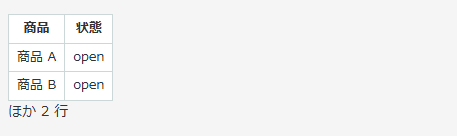
「一覧にテーブル行を表示」は、条件に合うテーブル行を一覧のセル内に表示するプラグインです。たとえば、明細のうち未対応の行だけを表示できます。表示先は、一覧に含まれるテーブル外の文字列(1行)フィールドです。保存済みの値の下に表を追加し、レコードのデータは変更しません。
ZIP をダウンロード表示列と行の条件を選択できます
対象の一覧・テーブル・表示列・行の条件・行数の上限・表示先の組み合わせを、1 アプリに 5 つまで登録できます。対象の一覧は、すべての表形式の一覧か、1 つの一覧を選べます。行の条件は「等しい」「等しくない」「空」「空でない」「含む」から選択できます。条件を指定しない場合は、すべての行が対象です。
行数の上限は既定で 5 行です。1〜100 行から選択でき、上限を超える場合は「ほか N 行」と表示します。N は表示しきれなかった行の数です。条件に合う行が無いときは「条件に合う行はありません。」と表示します。
導入方法
- ZIP をダウンロードし、kintone にプラグインをインストールしてください。
- 対象アプリにプラグインを追加してください。
- テーブル外に文字列(1行)フィールドを用意し、表形式の一覧の表示項目に追加してください。
- プラグインの設定画面で、対象の一覧・テーブル・表示列・表示先を選択してください。必要に応じて行の条件と行数の上限を設定してください。
- 設定を保存し、アプリの設定を運用環境に反映してください。
制限事項
- PC の表形式の一覧が対象です。モバイル、カレンダー、カスタマイズ形式、グラフには表示しません。
- 表示先が一覧に含まれない場合や、アクセス権などでセルを取得できない場合は表示しません。列の固定などでセル数とレコード数が一致しない場合も表示しません。
- 表示先フィールドの閲覧権限が無いユーザーには表示しません。テーブルやテーブル内のフィールドを削除したり、フィールドコードを変更したりした場合は、プラグインの設定を保存し直してください。
- 一覧を表示したときに描画します。一覧のインライン編集後は、再読み込みしてください。
- 比較は文字列として行います。複数選択の「等しい」は、いずれかの値との一致です。「含む」は部分一致です。空白文字は空とみなしません。添付ファイルはファイル名、ユーザー・組織・グループは表示名を使います。
- 追加のレコード取得や外部通信は行いません。設定画面では同じ kintone 環境からフィールドと一覧の定義を取得します。
ダウンロード
v0.1.0・10331 bytes。ZIP をダウンロードできます。
ZIP をダウンロード無料で利用できます。プラグインの画面は日本語と英語に対応します。
Table Rows in List
Display matching subtable rows inside a desktop list view cell. Select a single-line text destination outside the table and include it in your view. The table appears below the field value without changing saved records.
Add up to five configurations. Each selects all table views or one view, a table, multiple columns, an optional condition, a row limit and a destination. Conditions support equals, does not equal, empty, not empty and contains. The default row limit is five; choose from 1 to 100. Additional matching rows appear as a remaining count. If no rows match, the cell shows “No matching rows.”
Install the ZIP, add the plugin to your app, choose the fields in its settings, save and apply the app settings. Mobile, calendar, custom views and charts are unsupported. Inaccessible destination cells are skipped. Users without permission to view the destination field will not see the table. Resave the plugin configuration after deleting fields or tables, or changing field codes. Reload after inline editing. Comparisons use text; multi-value equality matches any item and contains uses substrings. Files use file names; people and groups use display names. Whitespace is not empty. No extra record API calls or external requests are made. Settings retrieve field and view definitions from the same tenant.